The Best Wireless Mouse in 2026: 5 Picks That Actually Earn Their Price
The Short Version
- Best overall: the Logitech MX Master 3S is still the default productivity mouse — quiet clicks, a fast MagSpeed wheel, and multi-device switching that just works.
- Best for gaming: the Logitech G Pro X Superlight 2 — ~60g, a top-tier sensor, and up to 8 kHz polling.
- Best do-it-all ergonomic: the Razer Basilisk V3 Pro bridges gaming and desk work with 11 buttons and a free-spin wheel.
- Best compact/travel: the Logitech MX Anywhere 3S. Best for wrist strain: the vertical Logitech Lift.
A wireless mouse is one of the few upgrades you touch every waking minute at a desk, and the category has quietly matured to the point where the "wireless tax" — latency, flaky connections, dying batteries — is mostly gone. That's good news and bad news: good because almost any modern mid-range mouse is competent, bad because marketing pages now blur together and the real differences hide in ergonomics, software, and battery behavior that spec sheets don't capture. Below we cut through it with picks matched to how you actually work, whether that's spreadsheets, shooters, a carry-on laptop bag, or a wrist that's had enough.
How We Evaluate Wireless Mice
Loiter Point does not run a hardware lab, and we won't pretend otherwise. Instead we synthesize published independent measurements — click latency, sensor accuracy, and battery endurance from testing outfits like RTINGS and mainstream review desks — alongside verified owner reports gathered across retailer reviews and community threads. When we cite a real-world figure, we attribute it and label it as reported or estimated rather than measured. Where the evidence is thin or reviewers disagree, we say so. Our ranking weighs four things: comfort and shape for a range of hand sizes, connection reliability across Bluetooth and dongle, software depth (button remapping, per-app profiles, multi-device switching), and value at the current street price. Prices below are approximate as of July 2026 and move constantly, especially around Prime Day and holiday sales — treat them as a reference point, not a quote.
The Picks
Logitech MX Master 3S
~$100 Click to zoom
Years into its run, the MX Master 3S remains the mouse most reviewers reach for when the job is "get work done." The headline change over the older Master 3 is the switch to Quiet Clicks — Logitech rates them at roughly 90% less click noise — paired with an 8K DPI sensor that independent testers note tracks reliably even on glass. The MagSpeed wheel flips between ratcheted and free-spin scrolling automatically, which is genuinely useful once you live with it. It pairs to three devices over Bluetooth or the Logi Bolt receiver and hops between them instantly.
The knocks are consistent across reviews: it's heavy and firmly right-handed, so lefties and anyone who wants a featherweight mouse should look elsewhere. For everyone else doing serious desk time, owner reports and independent reviews line up — there isn't a more complete productivity mouse near the price.
Check price on AmazonLogitech G Pro X Superlight 2
~$159 Click to zoom
If your priority is a fast, low-latency pointer for shooters, the G Pro X Superlight 2 is the one esports pros actually use. At roughly 60 grams it's a fraction of the MX Master's heft, and it drops the productivity features in favor of Logitech's Hero 2 sensor, LIGHTFORCE hybrid switches, and 2.4 GHz Lightspeed wireless that supports polling rates up to 8 kHz. Independent tests put its click latency among the lowest of any wireless mouse, which is the whole point here.
It is a premium price for a mouse with no Bluetooth and a deliberately plain shape, so it's overkill for anyone who just needs a work pointer. But for reaction-time-sensitive play, the reviewer consensus is that this is the reference wireless gaming mouse in 2026.
Check price on AmazonRazer Basilisk V3 Pro
~$89The Basilisk V3 Pro is the pick when you don't want to choose between gaming and productivity. Its contoured ergonomic shell carries 11 programmable buttons and a HyperScroll tilt wheel that free-spins like the MX Master's, plus Razer's Focus Pro 30K sensor. It launched near $160 and has since settled around $89 at retail, which is where it becomes a genuine value. Reviewers describe it as the most versatile mouse Razer ships — useful for MMOs and hybrid work sessions alike.
Note that its highest 4 kHz polling rates require Razer's separately sold dock or HyperPolling dongle, and RGB plus extra buttons mean more setup in software. For a do-everything right-handed mouse at its current price, though, it punches above its class.
Check price on AmazonLogitech MX Anywhere 3S
~$80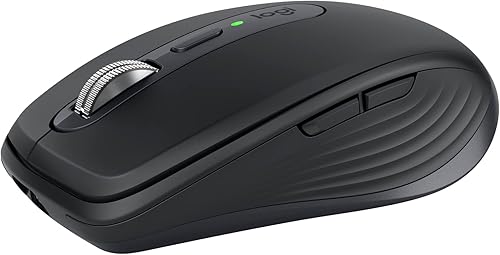 Click to zoom
The MX Anywhere 3S takes most of what makes the Master great — the 8K DPI any-surface sensor, Quiet Clicks, MagSpeed scrolling, multi-device switching — and shrinks it into a mouse that disappears into a laptop sleeve. It's the obvious choice if you work from cafes, hot desks, or a couch, and it still tracks cleanly on glass and other awkward surfaces where cheaper compacts stumble.
The tradeoff is inherent to the size: no dedicated thumb rest and a lower, flatter body that's less comfortable for large hands over a full day. As a second mouse for the road, owner reports rate it highly.
Check price on AmazonLogitech Lift Vertical
~$70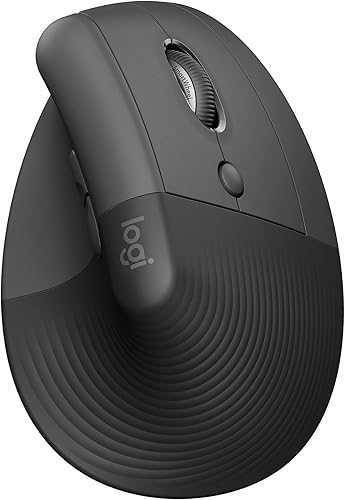 Click to zoom
If a flat mouse leaves your wrist aching, the Lift's 57-degree vertical angle puts your hand in a more neutral "handshake" position, which many owners report meaningfully reduces strain. Unlike Logitech's larger MX Vertical, the Lift comes in sizes and a left-handed variant, so more people can find a comfortable fit. It keeps the quiet clicks, six buttons, and Bluetooth/Bolt multi-device switching that make Logitech's lineup easy to live with.
A vertical mouse takes a day or two to adjust to, and the Lift is built for comfort rather than precision, so gamers should skip it. As an ergonomic daily driver, it's the most accessible vertical option we'd recommend.
Check price on AmazonBoth connect wirelessly, but they behave differently. Bluetooth needs no USB port and pairs with phones and tablets, at the cost of slightly higher and less consistent latency — fine for spreadsheets, not ideal for competitive aiming. A dedicated 2.4 GHz receiver (Logitech Bolt/Lightspeed, Razer HyperSpeed) holds a tighter, lower-latency link, which is why every serious gaming mouse ships one. The productivity picks here support both so you can use Bluetooth on the road and the dongle at your desk. Polling rate — how often the mouse reports position, from a standard 1,000 Hz up to 8,000 Hz — mainly matters for high-refresh gaming and can noticeably increase battery drain at the top settings.
At a Glance
| Mouse | Best for | Weight | Connection | ~Price |
|---|---|---|---|---|
| MX Master 3S | Overall / office | 141 g | BT + Bolt | $100 |
| G Pro X Superlight 2 | Gaming | ~60 g | Lightspeed | $159 |
| Razer Basilisk V3 Pro | Gaming + work | ~112 g | HyperSpeed + BT | $89 |
| MX Anywhere 3S | Travel / compact | ~99 g | BT + Bolt | $80 |
| Logitech Lift | Wrist comfort | ~125 g | BT + Bolt | $70 |
| M720 Triathlon (budget) | Value / multi-device | ~135 g | BT + Unifying | $30–40 |
On a tight budget, the Logitech M720 Triathlon is the value call. It's an older design, but reviewers still recommend it for office use: six buttons, multi-device switching over Bluetooth or the Unifying receiver, and a single AA that Logitech rates for up to two years. You give up the fast electromagnetic scroll wheel and USB-C charging, but for roughly a third of the MX Master's price, it covers the fundamentals well.
Bottom Line
For most people, the MX Master 3S is the safe, do-everything answer and the one we'd hand to a friend without a follow-up question. If you game seriously, the G Pro X Superlight 2 is worth the premium; if you want one mouse for play and work, the discounted Basilisk V3 Pro is the value story of this list. Travelers should grab the MX Anywhere 3S, and anyone fighting wrist pain should try the vertical Lift before spending more. Whatever you pick, buy on a sale — this category discounts often, and paying list price is rarely necessary.