The Best Portable SSDs (2026)
The Short Version
- Best overall value: the Crucial X10 Pro — full 20Gbps speed (up to 2,100 MB/s read) at a price that routinely undercuts the premium drives.
- Best for long, sustained transfers: the Samsung T9 holds its write speed longer than the pack once the cache runs out.
- Best rugged all-rounder: the SanDisk Extreme (V2) — 1,050 MB/s, IP65 dust/water resistance, and one of the most-owned drives out there.
- Best on a budget: the Crucial X9 Pro — 1,050 MB/s and frequently the cheapest reputable 2TB drive.
A portable SSD is one of the few upgrades that pays off the moment you plug it in: no moving parts, pocketable, and fast enough to edit 4K video straight off the drive or move a hundred gigabytes in the time it takes to refill your coffee. But the category is quietly split down the middle, and the marketing does its best to hide the line. Some drives run on USB 3.2 Gen 2 (10Gbps, ~1,050 MB/s), and some run on USB 3.2 Gen 2x2 (20Gbps, ~2,000 MB/s). Pay for the faster class and plug it into the wrong port, and you get exactly half the speed you paid for.
Below are four drives worth buying in 2026, chosen for real-world speed, how well they hold that speed on big transfers, durability, and price. Every figure here is a manufacturer spec or a number from published independent testing — we say which, and we don't pretend to run a lab.
How We Evaluate
Loiter Point does not operate a hardware testing lab. Our rankings synthesize three things: the manufacturer's rated specifications, published measurements from independent reviewers who do run controlled tests (outlets like Tom's Hardware and dedicated storage testers), and the pattern of verified owner reports at retail. Where we cite a real-world figure, it comes from independent testing and is labeled that way; where a number is a manufacturer rating, we call it "rated." The single most important thing independent testing reveals about portable SSDs is sustained write behavior — how fast a drive stays once its fast SLC cache fills mid-transfer — so we weight that heavily rather than trusting peak numbers on the box.
 Click to zoom
Crucial X10 Pro
The X10 Pro delivers the full 20Gbps experience — a rated 2,100 MB/s read and 2,000 MB/s write — at a price that, in independent deal tracking, has dropped to around $149 for 2TB, well under the premium drives. It's IP55 dust/water resistant with a rated drop protection up to 7.5 feet, and works across PC, Mac, PS5, and Xbox. The caveat, which independent testing is clear about: after roughly 50GB of continuous writing the SLC cache empties and speeds settle to around 900 MB/s. For the vast majority of transfers that never happens; for someone regularly dumping 200GB video cards, the Samsung below holds up better.
| Interface | USB 3.2 Gen 2x2 (20Gbps) |
| Rated speed | 2,100 MB/s read / 2,000 MB/s write |
| Sustained write (independent tests) | ~900 MB/s after cache (est. real-world) |
| Durability | IP55, drop-rated to 7.5 ft |
| Capacities | 1TB / 2TB / 4TB |
 Click to zoom
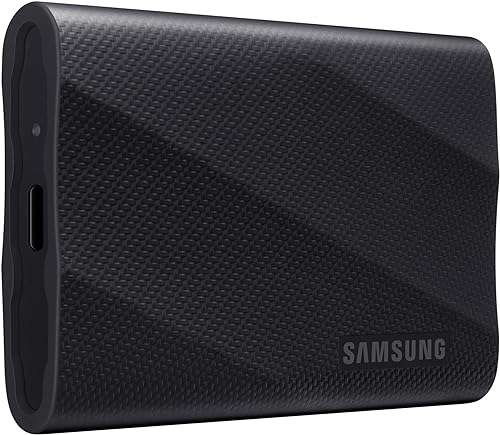
Samsung T9
Same 20Gbps class and rated up to 2,000 MB/s read / 1,950 MB/s write, but the T9's advantage shows up on the transfers that punish cheaper drives. In independent stress testing it maintained its sustained write speed throughout a 400GB folder copy long after the SLC cache was exhausted — where most rivals sag, it holds around 1,000 MB/s. Samsung's thermal control keeps the enclosure below ~140°F under load so it doesn't throttle when it heats up, and the build is rated to survive drops from up to 3 meters. It usually costs more than the X10 Pro; you're paying for endurance, not peak numbers.
| Interface | USB 3.2 Gen 2x2 (20Gbps) |
| Rated speed | 2,000 MB/s read / 1,950 MB/s write |
| Sustained write (independent tests) | ~1,000 MB/s, held on 400GB copy (reported) |
| Durability | Drop-rated to 3 m, active thermal control |
| Capacities | 1TB / 2TB / 4TB |
 Click to zoom
SanDisk Extreme (V2)
The Extreme sits one speed class down — USB 3.2 Gen 2 at a rated and independently confirmed ~1,050 MB/s read — but for most people that's plenty, and it's the drive you buy when the SSD is going in a backpack or on a shoot. IP65 water and dust resistance, a rugged rubberized body with a carabiner loop, and one of the deepest verified owner-review histories in the category (tens of thousands of ratings averaging 4.6 stars). Independent testing clocks a 30GB video project copy in roughly 45 seconds. If you don't have a 20Gbps port, you literally cannot use the speed of the drives above — and this becomes the smarter buy.
| Interface | USB 3.2 Gen 2 (10Gbps) |
| Rated speed | 1,050 MB/s read / 1,000 MB/s write |
| Real-world (independent tests) | ~1,050 MB/s; ~45s for a 30GB project (reported) |
| Durability | IP65 water/dust resistant |
| Capacities | 1TB / 2TB / 4TB |
 Click to zoom
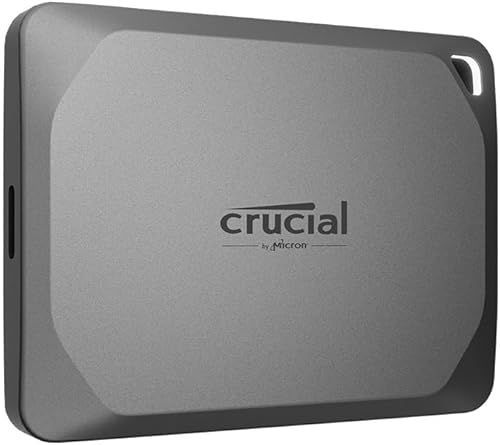
Crucial X9 Pro
The X9 Pro is the sensible-money pick: the same 1,050 MB/s read/write class as the SanDisk, water- and dust-resistant, in a slim aluminum body barely bigger than a couple of stacked credit cards. Independent deal tracking has seen 2TB fall to around $119, which regularly makes it the cheapest reputable 2TB drive from a first-tier brand. You give up the top-end 20Gbps speed and the SanDisk's rugged rubber armor, but for backing up a laptop, carrying a Steam library, or general file shuttling, nothing here is a compromise you'll feel.
| Interface | USB 3.2 Gen 2 (10Gbps) |
| Rated speed | 1,050 MB/s read / 1,050 MB/s write |
| Form factor | Slim aluminum, ~2 credit cards |
| Durability | Water & dust resistant |
| Capacities | 1TB / 2TB / 4TB |
Nerd box: the port matters as much as the drive
A 20Gbps drive (USB 3.2 Gen 2x2, like the X10 Pro and T9) only hits ~2,000 MB/s when it's plugged into a 20Gbps host port. That interface is common on recent PCs but rare on Macs, which mostly expose Thunderbolt/USB4 and 10Gbps USB — so a Mac user often sees a 20Gbps drive run at ~1,000 MB/s and would do just as well with the cheaper 10Gbps SanDisk or X9 Pro. If you need more than 2,000 MB/s, that's USB4/Thunderbolt territory (drives like the SanDisk Extreme PRO USB4 and Corsair EX400U), which costs substantially more and only makes sense for heavy 8K/RAW workflows. Match the drive class to the port you have before paying for speed you can't use.
Quick comparison
| Drive | Interface | Rated read | Sustained write | Best for |
|---|---|---|---|---|
| Crucial X10 Pro | 20Gbps | 2,100 MB/s | ~900 MB/s | Value + speed |
| Samsung T9 | 20Gbps | 2,000 MB/s | ~1,000 MB/s | Long transfers |
| SanDisk Extreme | 10Gbps | 1,050 MB/s | ~1,000 MB/s | Rugged travel |
| Crucial X9 Pro | 10Gbps | 1,050 MB/s | ~1,000 MB/s | Budget backups |
Bottom Line
For most people with a modern PC, the Crucial X10 Pro is the drive to buy — 20Gbps speed at a 10Gbps-ish price. If you routinely move enormous folders and want the speed to stay fast, pay the premium for the Samsung T9. And if you're on a Mac or an older laptop without a 20Gbps port — or you just want a rugged, cheap, proven drive — the SanDisk Extreme or Crucial X9 Pro will serve you for years and you'll never notice the difference. Buy for the port you have, not the number on the box.
Affiliate disclosure: Loiter Point earns commissions from qualifying purchases made through links on this page, at no extra cost to you. This never affects our rankings — picks are based on independent test data and verified owner reports. Prices are approximate and fluctuate; confirm the current price on Amazon before buying.
© 2026 Loiter Point — Consumer tech reviews built on real evidence.