The Best Mesh Wi-Fi Systems (2026)
The Short Version
- Best overall: the TP-Link Deco BE63 (3-pack) — full tri-band Wi-Fi 7, four 2.5G ports on every node, and the best price-to-performance of any system independent labs rank at the top.
- Best for smart homes & simplicity: the eero Pro 7 (3-pack) — tri-band Wi-Fi 7 with a built-in Thread/Matter/Zigbee hub and the most foolproof app in the category.
- Best for big houses: the Netgear Orbi 770 (3-pack) — a dedicated backhaul band and up to 8,000 sq ft of rated coverage.
- Cheapest Wi-Fi 7: the Amazon eero 7 (3-pack) — dual-band Wi-Fi 7 that covers most homes for the price of an older Wi-Fi 6 kit.
- Best budget: the TP-Link Deco X55 (3-pack) — a proven Wi-Fi 6 mesh that routinely costs about $50 a node.
A single router sitting by the front door is the reason your back bedroom buffers. Mesh Wi-Fi fixes that the honest way — with two or three nodes that blanket the house in one seamless network, so your phone hands off from unit to unit as you walk around without dropping the connection. It's the upgrade that makes every other device you own — the streaming stick in the bedroom, the tablet on the couch, the watch syncing on your wrist — quietly work better.
The catch in 2026 is that the category has split across two Wi-Fi generations and a huge price spread, and the boxes shout numbers most homes will never touch. Below are five systems worth buying, chosen for real-world coverage, throughput that matches your actual internet plan, how the backhaul is built, and price. Every figure here is a manufacturer spec or a number from published independent testing — we say which, and we don't pretend to run a lab.
How We Evaluate
Loiter Point does not operate a networking test lab. Our rankings synthesize three things: each manufacturer's rated specifications, published measurements from independent reviewers who do run controlled throughput and range tests (outlets like RTINGS, Tom's Hardware, and Dong Knows Tech), and the pattern of verified owner reports at retail. Where we cite a real-world figure it comes from independent testing and is labeled that way; where a number is a manufacturer rating, we call it "rated." The single most useful thing independent testing reveals about mesh is how the system carries traffic between nodes — a dedicated backhaul band versus one shared with your devices makes a bigger real-world difference than any peak-speed number on the box — so we weight that and honest whole-home coverage over headline gigabit ratings.
 Click to zoom
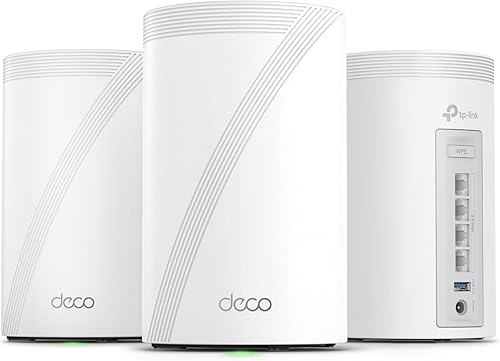
TP-Link Deco BE63
This is the system independent testing keeps landing on as the best value in Wi-Fi 7 mesh. RTINGS ranks the Deco 7 Pro BE63 at the top of its mesh chart, and the reason is balance: it's genuinely tri-band (2.4, 5, and 6 GHz), so it can dedicate the fast 6 GHz band to node-to-node backhaul while your devices use the others, and every unit carries four 2.5-gigabit ports for wired backhaul or fast NAS and console connections. Coverage runs to roughly 7,700 sq ft across three nodes. The honest caveat: TP-Link's HomeShield security suite locks some features behind a subscription, and the app is more menu-heavy than eero's. For most homes on a 1–2.5 Gbps plan, nothing else here is a smarter buy.
| Standard | Wi-Fi 7 (tri-band, BE10000) |
| Rated coverage | Up to ~7,700 sq ft (3-pack) |
| Wired ports | 4× 2.5 GbE per node |
| Backhaul | Dedicated 6 GHz wireless, or wired 2.5G |
| Independent standing | RTINGS' top-rated mesh (reported) |
 Click to zoom
eero Pro 7
If you want mesh you set up in ten minutes from a phone and then forget about, this is it. The eero Pro 7 is tri-band Wi-Fi 7 rated for internet plans up to 5 Gbps and about 6,000 sq ft across three nodes, with two auto-sensing 5-gigabit ports on each unit. In RTINGS' testing it averaged roughly 1.2 Gbps across bands with clean, dropout-free handoffs as you move through the house. Its real edge over the TP-Link is the smart-home side: every node doubles as a Thread, Matter, and Zigbee border router, so it can act as the hub for your smart bulbs and sensors, and it backs the hardware with a three-year warranty. The trade-offs are a higher price and that some advanced controls sit behind the optional eero Plus subscription.
| Standard | Wi-Fi 7 (tri-band) |
| Rated coverage | Up to 6,000 sq ft (3-pack) |
| Real-world throughput | ~1.2 Gbps avg across bands (est. real-world, per RTINGS) |
| Wired ports | 2× 5 GbE per node |
| Smart home | Thread / Matter / Zigbee hub built in |
 Click to zoom
Netgear Orbi 770 (RBE773)
Orbi's whole design philosophy is a dedicated backhaul band — a private highway between the router and satellites that never competes with your devices — and on a big or dense house that shows up as steadier speed in the far rooms. The 770 series is tri-band Wi-Fi 7 (BE11000) rated up to 11 Gbps and about 8,000 sq ft across three units, with a 2.5-gigabit internet port. Independent reviewers call it a solid, straightforward system and specifically a much better deal than Netgear's far pricier 970 series. Two honest caveats: it has no 2.4/5/6 flexibility issues to speak of, but it carries fewer extra wired ports than the Deco, and Netgear historically pushes its Armor security subscription hard. If your home is large and you want set-and-forget range, it earns its place.
| Standard | Wi-Fi 7 (tri-band, BE11000) |
| Rated coverage | Up to 8,000 sq ft (3-pack) |
| Rated speed | Up to 11 Gbps aggregate |
| Backhaul | Dedicated wireless backhaul band |
| Internet port | 2.5 GbE WAN |
 Click to zoom
Amazon eero 7
The dual-band eero 7 is how you get onto Wi-Fi 7 without paying tri-band money. It drops the separate 6 GHz backhaul band of the Pro model, but keeps the thing most people actually buy eero for — the effortless app, automatic updates, and reliable handoffs — and it's rated for internet plans up to 2.5 Gbps, roughly 6,000 sq ft across three nodes, and 120-plus connected devices, with a 2.5-gigabit port on each unit. Because it shares one band for backhaul and clients, sustained speed in the farthest room won't match the tri-band systems above, and there's no built-in Thread hub. But for a normal home on a gigabit-or-under plan it's often priced within a few dollars of last generation's Wi-Fi 6 kits, which makes it the easy default at the bottom of the Wi-Fi 7 ladder.
| Standard | Wi-Fi 7 (dual-band) |
| Rated coverage | Up to 6,000 sq ft (3-pack) |
| Supports plans | Up to 2.5 Gbps |
| Wired ports | 2× 2.5 GbE per node |
| Devices | 120+ (rated) |
 Click to zoom
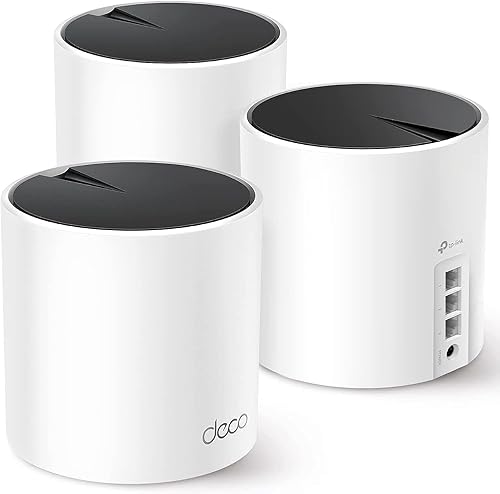
TP-Link Deco X55
Not everyone needs Wi-Fi 7, and the Deco X55 is the proof. It's a Wi-Fi 6 (AX3000) mesh rated for up to 6,500 sq ft across three nodes and around 150 devices, with three gigabit Ethernet ports per unit and support for wired Ethernet backhaul — the single best upgrade you can make to any mesh if you can run a cable. It has one of the deepest, most positive owner-review histories in the category, and it regularly sells for about $50 a node, undercutting many single standalone routers. You give up the 6 GHz band and multi-gig ports, so it's not the pick if you pay for gigabit-plus service. But on a typical 200–500 Mbps plan, you will not feel the difference, and you'll spend a quarter of the money.
| Standard | Wi-Fi 6 (dual-band, AX3000) |
| Rated coverage | Up to 6,500 sq ft (3-pack) |
| Wired ports | 3× Gigabit per node |
| Backhaul | Wireless or wired Ethernet backhaul |
| Devices | ~150 (rated) |
Nerd box: match the mesh to your internet plan, not the box
A mesh system can only ever hand your devices as much internet as your ISP delivers. If you pay for a 300 Mbps plan, an 11 Gbps tri-band Wi-Fi 7 system will feel exactly like a $150 Wi-Fi 6 kit for internet browsing and streaming — the extra headroom only matters for moving files between devices on your own network, or if you actually buy multi-gigabit service. Two things genuinely change your experience: backhaul (a dedicated band or a wired Ethernet run between nodes keeps speed from collapsing in far rooms) and the 6 GHz band on Wi-Fi 7 tri-band systems, which gives that backhaul a clear lane. So the honest buying order is: run a cable between nodes if you possibly can; if you can't, get a tri-band system so the backhaul has its own band; and don't pay for gigabit ratings you have no way to feed. A network-attached drive or fast local NAS is about the only home use that will notice the difference between these systems on a sub-gigabit plan.
Quick comparison
| System | Wi-Fi | Rated coverage | Backhaul | Best for |
|---|---|---|---|---|
| TP-Link Deco BE63 | 7 tri-band | ~7,700 sq ft | 6 GHz / wired 2.5G | Overall value |
| eero Pro 7 | 7 tri-band | 6,000 sq ft | Tri-band + 5G ports | Smart homes |
| Netgear Orbi 770 | 7 tri-band | 8,000 sq ft | Dedicated band | Large houses |
| Amazon eero 7 | 7 dual-band | 6,000 sq ft | Shared band | Cheap Wi-Fi 7 |
| TP-Link Deco X55 | 6 dual-band | 6,500 sq ft | Wireless / wired | Budget |
Bottom Line
For most homes, the TP-Link Deco BE63 is the system to buy — genuine tri-band Wi-Fi 7 and multi-gig ports at a price the premium brands can't match. If you live in the smart-home world and want the simplest possible app plus a built-in Matter hub, pay up for the eero Pro 7; if your house is big and you want dead-simple long range, the Netgear Orbi 770 and its dedicated backhaul earn the premium. Want Wi-Fi 7 on a budget? The eero 7 is the value entry point. And if you're on a normal sub-gigabit plan and just want the dead zones gone, the TP-Link Deco X55 does that for about a quarter of the price — buy for the internet plan you actually have, not the number on the box.
Affiliate disclosure: Loiter Point earns commissions from qualifying purchases made through links on this page, at no extra cost to you. This never affects our rankings — picks are based on independent test data and verified owner reports. Prices are approximate and fluctuate; confirm the current price on Amazon before buying.
© 2026 Loiter Point — Consumer tech reviews built on real evidence.