Best Portable Monitors (2026): Ranked on Independent Testing
- Best overall (most people): the Arzopa Z1FC (~$100, often on sale near $97) — a 16.1" 1080p 144Hz IPS panel that runs off one USB-C cable and hits the price-to-usefulness sweet spot for a second screen.
- Best premium / QHD: the Arzopa Z3FC (~$180–200, seen ~$143) — a 16.1" 2.5K 180Hz screen in a 780g aluminum body that reviewers call one of the cheapest QHD portables worth owning.
- Best for reliability: the ASUS ZenScreen MB16ACV (~$150–180) — 15.6" 1080p, 0.83kg, and a 3-year warranty from a brand that supports its displays.
- Best for docking a laptop: the ViewSonic VG1655 (~$150) — dual USB-C with 60W two-way power and a portrait-capable stand for real office use.
- Best budget: the Arzopa A1 (~$75) — a usable 15.6" travel screen, as long as you know its color gamut is limited.
How We Evaluate Portable Monitors
Loiter Point does not run a test lab, and we won't pretend otherwise. Portable monitors are a category where that honesty matters, because the market is flooded with near-identical panels sold under dozens of brand names, and the box specs — "1080p," "IPS," "USB-C," "HDR" — hide the two things that decide whether one is worth buying: how it connects to your specific device, and whether the panel is good or just cheap. Our rankings synthesize published independent testing, primarily from PCWorld, Tom's Hardware, TechRadar and RTINGS, cross-referenced against long-term owner reports that surface what a one-week review misses: flaky USB-C handshakes with certain laptops, wobbly kickstands, backlight bleed, and units that need a second power cable the listing never mentioned. Where a manufacturer quotes a color-gamut number, we treat it as rated and say so; where an independent lab has measured the panel — as Tom's Hardware did for the Arzopa A1, finding it covered 66.4% of sRGB against the marketing gloss — we use the measured figure and label it. Prices were checked in July 2026; portable monitors discount constantly and swing $30–$50 on any given week, so treat the numbers below as street estimates, not fixed tags.
The Picks
 Click to zoom
Arzopa Z1FC
The Z1FC is the portable monitor most people should buy, and it's the one reviewers keep returning to for the same reason: it does the job for about a hundred dollars without a glaring weakness. It's a 16.1-inch 1080p IPS panel, which is a slightly more comfortable size than the ubiquitous 15.6" screens, and its standout trick is a 144Hz refresh rate at a price where most rivals are stuck at 60Hz — the difference shows up in smoother scrolling and cursor movement, and it makes the screen viable for casual gaming off a laptop, Steam Deck or console. At 1.7 pounds and 9.3mm it slides into a laptop bag without ceremony, and a single USB-C cable carrying DisplayPort Alt Mode handles both video and power from a modern laptop. The caveats: the built-in kickstand is functional rather than sturdy, 1080p stretched over 16 inches is sharp enough for documents and video but not pixel-dense, and like every USB-C portable it leans on your host device's power — plug a phone or an older laptop into it and you'll likely need the included adapter. But as a cheap, well-rounded second screen, nothing at the price is more sensible. It pairs naturally with the desktop displays in our best monitors guide when you're home and travels when you're not.
Check price on Amazon → Click to zoom
Arzopa Z3FC
Step up to the Z3FC when you want the sharpness and refresh headroom the Z1FC leaves on the table. It's a 16.1-inch 2560×1440 panel — noticeably crisper than 1080p at this size — running at 180Hz, wrapped in a 780-gram aluminum body that reviewers repeatedly compare to a slim tablet rather than the usual flexy plastic. PCWorld and TechRadar have both praised it as one of the best-balanced portable monitors going, with TechRadar's hardware editor calling it a "perfectly balanced" daily second screen, and ServeTheHome flagging it as one of the cheapest 2.5K/180Hz portables on the market. In practice the QHD resolution is the real upgrade: text and spreadsheets look tighter, and the higher refresh keeps motion clean whether you're dragging windows or gaming. The tradeoffs are money and expectations — at ~$190 it costs nearly double the Z1FC, its HDR is a bonus feature rather than a true high-brightness experience, and to feed it a 2.5K/180Hz signal you'll want a host with a capable USB-C or Mini HDMI output. If you'll use the extra pixels and refresh, it's the portable to buy; if you just need a second screen for email on the road, it's overkill. Feeding it from fast external storage? Our best portable SSDs guide covers drives that ride the same USB-C bus.
Check price on Amazon → Click to zoom
ASUS ZenScreen MB16ACV
Not everyone wants to gamble on a house-brand panel, and the ZenScreen MB16ACV is the pick for buyers who'd rather pay a little more for a known quantity. ASUS has been making ZenScreens longer than most of the budget brands have existed, and it shows in the details reviewers consistently note: a solid anti-glare 15.6" 1080p IPS panel, a slim 10.5mm chassis at 0.83kg, universal USB-C compatibility that "just works" across laptops and many phones, and — the part that matters after the sale — a 3-year warranty with real support behind it. It's the productivity choice rather than the spec-sheet champion: 60Hz means it won't feel as fluid as the Arzopa Z1FC for scrolling or gaming, and you're paying a brand premium over near-identical no-name 1080p screens. But for a work travel monitor you'll rely on for years, the combination of build quality, broad device compatibility and warranty is exactly what the cheaper options cut to hit their price. Set it up next to the rest of a mobile kit — our best webcams and best USB microphones guides round out a travel call setup.
Check price on Amazon → Click to zoom
ViewSonic VG1655
The VG1655 is the one on this list built for a desk rather than just a bag, and it earns the "office" slot on connectivity. Its headline feature is a second USB-C port delivering up to 60W of two-way power: your laptop can power the monitor, or the monitor — fed by a wall adapter or power bank — can charge your laptop back, so a single screen doubles as a passthrough dock. RTINGS' review and ViewSonic's own spec sheet confirm the practical touches that make it work as a fixed second display: a stand that pivots into portrait as well as landscape (useful for reading code or long documents), a detachable magnetic cover, and a 3-year warranty with US-based support. It's a 15.6" 1080p 60Hz IPS panel, so like the ASUS it prioritizes reliability over refresh rate, and at ~1.8 pounds it's a touch heavier than the slimmest travel screens. But if the job is a permanent-ish second monitor beside a laptop — especially one where power delivery matters — its two-way USB-C is the feature the cheaper Arzopas don't offer. It anchors a tidy laptop desk alongside our best standing desks and best wireless mouse picks.
Check price on Amazon →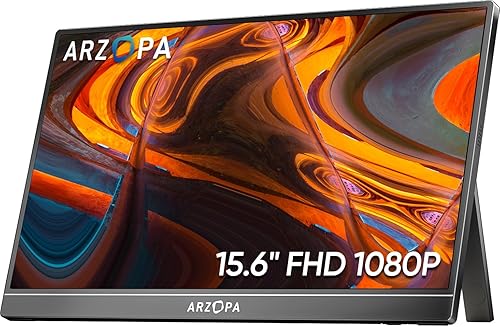 Click to zoom
Arzopa A1
When the goal is simply "a second screen for as little as possible," the Arzopa A1 is the budget answer, and Tom's Hardware's sub-$80 review lands on the same verdict: an excellent bargain, with clearly stated limits. It's a 15.6" 1080p IPS panel with a kickstand, dual speakers and both USB-C and Mini HDMI inputs, and for documents, spreadsheets, web pages and video calls it's perfectly clear and usable. The limit — and the reason it's this cheap — is the panel itself: independent testing measured it covering just 66.4% of sRGB and 47.1% of DCI-P3, so colors look muted next to a good laptop screen, and it's not a display you'd use for photo or video editing. It's also a plain 60Hz screen with basic build quality. But none of that matters much for its actual job. As a travel or dorm second monitor, a screen for a student, or a cheap way to extend a work laptop in a hotel room, it delivers the portability and no-fuss USB-C setup that count, and it leaves the rest of your budget intact. Just buy it for what it is — cheap and functional — not for color-critical work.
Check price on Amazon →Every portable monitor here advertises "single-cable USB-C," but whether that works is decided by the port on your device, not the screen. To drive a monitor over one USB-C cable, that port has to support DisplayPort Alternate Mode — the ability to send a video signal down the USB-C connector. Most laptops from the last few years do; many cheaper ones, and a lot of desktops' front ports, do not, in which case the cable carries data and power but no picture, and you'll get nothing on screen. The second variable is power. A portable monitor has no wall plug of its own by default — it sips power from the host over that same cable. A modern laptop can usually feed a 1080p 60Hz panel fine, but a phone, a Steam Deck, or a laptop already running hard may not supply enough, which is why every good portable ships with a USB-C power adapter and a second port: plug external power into one port, video into the other. This is also why refresh rate and resolution have a ceiling set by your source — a 180Hz 2.5K panel like the Z3FC only hits those numbers if your device's USB-C or Mini HDMI output can push that bandwidth. Before buying, check two things about your laptop or phone: does the USB-C port do DisplayPort Alt Mode (look for a small "DP" logo or check the spec sheet), and can it deliver enough power on its own. If either is shaky, plan to use the monitor's included adapter — and know that a Mini HDMI input is the universal fallback when USB-C video isn't available.
Comparison Table
| Monitor | Street price | Size / res | Panel · refresh | Standout | Best for |
|---|---|---|---|---|---|
| Arzopa Z1FC | ~$97–110 | 16.1" · 1080p | IPS · 144Hz | 144Hz at ~$100 | Best overall value |
| Arzopa Z3FC | ~$143–190 | 16.1" · 2.5K | IPS · 180Hz | QHD + aluminum body | Premium / sharpest |
| ASUS MB16ACV | ~$150–180 | 15.6" · 1080p | IPS · 60Hz | 3-yr warranty, build | Reliability |
| ViewSonic VG1655 | ~$140–160 | 15.6" · 1080p | IPS · 60Hz | 60W two-way USB-C | Docking a laptop |
| Arzopa A1 | ~$70–80 | 15.6" · 1080p | IPS · 60Hz | Lowest price | Budget / travel |
Sizes, panel types, refresh rates and port counts reflect manufacturer specs; the Arzopa A1 color figure is labeled measured because it comes from Tom's Hardware's independent testing rather than the box. "Best for" reflects the consensus of published independent testing (PCWorld, TechRadar, Tom's Hardware, RTINGS) and owner reports — not our own lab, which we don't have. Prices are July 2026 street estimates and move constantly.
What We'd Skip
Three honest warnings. First, be wary of ultra-cheap "4K" portable monitors: at 15–16 inches you can barely see the extra pixels, the higher resolution taxes your host device's battery and USB-C bandwidth harder, and the panels at those prices are often mediocre in the ways that matter — brightness and color. A good 1080p or 2.5K screen is the smarter buy. Second, don't pay a big premium for a touchscreen unless you have a specific use for it; on most portables touch adds cost and weight for a feature you'll rarely use, and it drains more power. Third, read the connectivity fine print before buying — a listing that only shows Mini HDMI and micro-USB (not USB-C DisplayPort Alt Mode) means two cables and an external power brick every time, which defeats the point of "portable." Match the panel and ports to the device you'll plug into, and you'll be happy; buy on a spec-sheet number your laptop can't feed, and you'll be returning it.
Bottom Line
Most people should buy the Arzopa Z1FC — a 16.1" 144Hz second screen that runs off one USB-C cable for about $100 and does everything a portable monitor needs to. If you want more sharpness and refresh and will use them, step up to the 2.5K 180Hz Arzopa Z3FC. Buyers who want a known brand and a real warranty should take the ASUS ZenScreen MB16ACV; if you're docking a laptop and care about power passthrough, the ViewSonic VG1655 and its 60W two-way USB-C is the office pick. And on the tightest budget, the Arzopa A1 gets you a usable travel screen for around $75 — just not for color work. Building out the rest of the workspace? See our guides to the best monitors, best standing desks, and best wireless keyboards.