The Best Wi-Fi Routers of 2026
Single-box routers ranked on published independent testing and owner reports — not marketing throughput numbers. If your home needs mesh instead, we say so.
TL;DR
- Best for most homes: the TP-Link Archer BE550 — real tri-band Wi-Fi 7 with 6GHz and five 2.5G ports at a mainstream price.
- Best budget Wi-Fi 7: the TP-Link Archer BE230 gets you MLO and dual 2.5G ports for around $100.
- Best for wired/multi-gig setups: the ASUS RT-BE88U — dual 10G, SFP+, and eight 2.5G-or-better ports.
- Best big-house single box: the Netgear Nighthawk RS700S, with a 10-gig port and reported coverage to ~3,500 sq ft.
A router is the one piece of your network every device touches, and it's the piece people upgrade least often. Wi-Fi 7 hardware has finally hit sane prices in 2026 — you can get genuine multi-link operation (MLO) and 2.5-gig wired ports for around $100 — so this is a good year to replace an aging AC or early AX box. But faster silicon does not fix a house that's too big or too dense for one router. Below we rank five standalone routers and are blunt about where a mesh system is the smarter buy.
The "BE9300" and "BE19000" labels on the box add up the theoretical peak of every band at once — a number no single device will ever see. What real clients get comes from three things: channel width (Wi-Fi 7's 320MHz channels live only on 6GHz), MLO (a client bonding two bands into one link for lower latency and better reliability), and — critically — your wired ports. A router advertising 9.2Gbps of wireless behind a single 1-gig internet port and 1-gig LAN ports is capped at 1Gbps to anything wired. That's why we weight multi-gig ports (2.5G/10G) heavily: for most people the wired bottleneck bites long before the wireless one does.
Practical takeaway: 6GHz + 320MHz matters most within a room or two of the router. Through walls, the 5GHz band does the heavy lifting on every router here, so range claims should be read against 5GHz performance, not the headline 6GHz peak.
How We Evaluate Routers
Loiter Point does not run a wireless test lab, and we don't pretend to. Our rankings synthesize published independent testing from outlets that do measure throughput and range under controlled conditions — among them Dong Knows Tech, Tom's Hardware, Tom's Guide, and RTINGS — cross-referenced against patterns in verified owner reports (firmware stability, real coverage, port behavior, support headaches). Where those sources disagree, or where evidence is thin, we say so instead of inventing a number.
In the spec grids below, "rated" rows are the manufacturer's on-paper figures. Rows marked "est. real-world (reported)" summarize what independent testers and owners actually see — and they are ranges, because throughput swings with distance, client hardware, channel width, and interference. Treat them as directional, not as guarantees for your walls.
The Picks
 Click to zoom
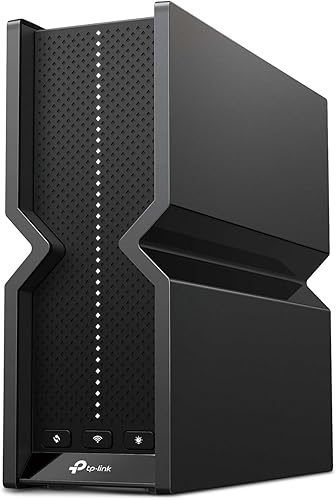
TP-Link Archer BE550
For most homes this is the sweet spot: a true tri-band Wi-Fi 7 router with a working 6GHz band, MLO, and — the part that matters — five 2.5-gig ports, so wired devices aren't stuck at 1Gbps. Independent reviews consistently land it as the best-value Wi-Fi 7 router of the cycle, and owners report stable firmware and easy EasyMesh expansion if you later add a node.
| Spec | Rated | Est. real-world (reported) |
|---|---|---|
| Wireless class | BE9300, tri-band | ~1.5–2.3 Gbps to a close Wi-Fi 7 client |
| Wired ports | 5× 2.5GbE + USB 3.0 | 2.5G confirmed both WAN and LAN |
| Coverage | Up to ~2,000 sq ft | Reliable for a mid-size home; walls cut 6GHz fast |
 Click to zoom
TP-Link Archer BE230
The cheapest way into real Wi-Fi 7. It's dual-band (no 6GHz), so you're buying MLO and multi-gig, not raw bandwidth — but reviewers note that even at ~$100 it includes two 2.5-gig ports, which many pricier Wi-Fi 6/6E routers still omit. If your internet is 1–2 Gbps and your priority is a solid, modern router without spending real money, this is the value pick.
| Spec | Rated | Est. real-world (reported) |
|---|---|---|
| Wireless class | BE3600, dual-band | ~1.3–1.7 Gbps to a close 5GHz client |
| Wired ports | 2× 2.5GbE + 3× 1GbE + USB 3.0 | 2.5G WAN + 2.5G LAN as advertised |
| Coverage | Small-to-mid home | Fine one-to-two rooms out; not a big-house box |
 Click to zoom
ASUS RT-AX88U Pro
Not everyone needs Wi-Fi 7. If your devices are mostly Wi-Fi 6 and you want a mature, rock-stable router with a deep feature set, the RT-AX88U Pro remains a strong buy. It brings dual 2.5G ports with WAN aggregation, ASUS's subscription-free AiProtection security, and one of the most reliable firmware track records among owners. You're paying for stability and features, not the newest standard.
| Spec | Rated | Est. real-world (reported) |
|---|---|---|
| Wireless class | AX6000, dual-band | ~1.2–1.5 Gbps to a close Wi-Fi 6 client |
| Wired ports | 2× 2.5GbE + 4× 1GbE + USB 3.0 | Dual 2.5G with link aggregation |
| Coverage | Mid-to-large home | Strong 5GHz range; among the better single-box reach |
 Click to zoom
ASUS RT-BE88U
The port monster. If your bottleneck is wired — a NAS, a 10-gig internet plan, wired backhaul, or a rack of 2.5G devices — nothing else here competes. You get two 10G ports plus an SFP+ cage and four 2.5G ports, for 34G of total wired capacity. The trade-off, and it's a real one: no 6GHz band, so this is a wired-first router that happens to also do Wi-Fi 7 on 2.4/5GHz. Buy it for the ports, not the airtime.
| Spec | Rated | Est. real-world (reported) |
|---|---|---|
| Wireless class | BE7200, dual-band (no 6GHz) | ~1.5–2 Gbps to a close 5GHz Wi-Fi 7 client |
| Wired ports | 2× 10G + SFP+ + 4× 2.5G + 4× 1G | 10G confirmed; standout wired flexibility |
| Coverage | Mid-to-large home | Good 5GHz reach; 6GHz absence limits peak close-range |
 Click to zoom
Netgear Nighthawk RS700S
The flagship in this list, and the one to reach for when you want maximum single-router reach and headroom. It's tri-band with a full 6GHz radio, a 10-gig internet port, and reported coverage to roughly 3,500 sq ft — the strongest one-box range here. It's expensive and physically large, and its 1-gig LAN ports (beside the 10G pair) are a fair knock. But for a big home where you'd rather not run mesh, it's the pick.
| Spec | Rated | Est. real-world (reported) |
|---|---|---|
| Wireless class | BE19000, tri-band | ~1.8–2.5 Gbps to a close Wi-Fi 7 client |
| Wired ports | 10G WAN + 10G LAN + 4× 1GbE | Dual 10G; remaining LAN ports only 1G |
| Coverage | Up to ~3,500 sq ft | Best single-box range in this guide (reported) |
Side-by-Side
| Router | Wi-Fi | Bands | Top wired port | Best for | Price |
|---|---|---|---|---|---|
| TP-Link Archer BE550 | Wi-Fi 7 | Tri (incl. 6GHz) | 2.5G ×5 | Most homes | ~$200 |
| TP-Link Archer BE230 | Wi-Fi 7 | Dual | 2.5G ×2 | Budget / small home | ~$100 |
| ASUS RT-AX88U Pro | Wi-Fi 6 | Dual | 2.5G ×2 | Stability, Wi-Fi 6 homes | ~$250 |
| ASUS RT-BE88U | Wi-Fi 7 | Dual (no 6GHz) | 10G ×2 + SFP+ | Wired / multi-gig | ~$330 |
| Netgear RS700S | Wi-Fi 7 | Tri (incl. 6GHz) | 10G ×2 | Large home, one box | ~$550 |
Prices are approximate street prices at publication and move often — tap any link for the live number.
Every router here tops out around 2,000–3,500 sq ft in a reasonably open layout. The moment you add multiple floors, brick or plaster walls, or a footprint past ~2,500 sq ft, a single box — however expensive — leaves dead zones a bigger antenna count can't fix. In those homes a mesh system beats a flagship router at the same money. If that's you, this guide is the wrong page; buy coverage, not peak throughput.
Bottom Line
For most people, the TP-Link Archer BE550 is the router to buy in 2026: genuine tri-band Wi-Fi 7, all-2.5G ports, and a price that no longer punishes you for wanting the current standard. Spending less? The Archer BE230 delivers MLO and dual 2.5G for around $100. Want maximum wired flexibility, the ASUS RT-BE88U; maximum single-box coverage, the Nighthawk RS700S. And if your devices are still Wi-Fi 6, the RT-AX88U Pro is the stable, feature-rich pick that won't leave you wanting. Just remember the honest limit: a router is one box. If your home is big or dense, put the money toward mesh instead.