Best USB-C Hubs & Docking Stations (2026)
The Short Version
- Best overall: the Anker 555 8-in-1 hits the sweet spot — 4K@60Hz HDMI, 85W passthrough, 10Gbps USB-C, and Gigabit Ethernet for around $45.
- Best for multi-monitor: the UGREEN Revodok Pro 210 10-in-1 adds dual HDMI and 100W PD for about $70.
- Best budget: the Anker 7-in-1 covers the essentials — 4K HDMI, data ports, card readers — for around $26 (no Ethernet).
- Best full dock: the CalDigit TS4 is a Thunderbolt 4 monster with 18 ports and 98W charging — the desk anchor if your laptop supports TB4.
A USB-C hub is the least glamorous accessory you'll buy this year and quite possibly the one you'll touch most. Modern thin-and-light laptops ship with two or three USB-C ports and nothing else, which is fine until you need to plug in a monitor, an SD card, wired Ethernet, and a mouse at the same time. The right hub turns a single port into a full desk; the wrong one throttles your display, drops your network, or gets too hot to leave plugged in.
Below are four picks spanning the range that actually matters — from a $26 travel dongle to a $300-plus Thunderbolt 4 dock. Every recommendation here is anchored to a verified product and price, and every performance claim is attributed to the source that measured it. Loiter Point does not run a testing lab, so we don't pretend to. What we do is read the measurements other people publish, cross-check them against what owners report, and tell you where the evidence is solid versus thin.
How We Evaluate USB-C Hubs
We do not run a hardware lab, and we won't dress up second-hand data as first-hand testing. Our rankings synthesize three things: published independent measurements from outlets that do have benchmarking setups (PCWorld, Engadget, XDA-Developers and comparable reviewers), the rated specifications from each manufacturer, and the pattern of verified-purchase owner reports on retail listings.
When we cite a real-world figure — a transfer speed, a charging wattage that lands lower than the rating, a thermal complaint — we label it as reported or estimated and point at where it came from. Specs pulled straight from the manufacturer are labeled "rated." When independent sources conflict, or when the data is simply too thin to be confident, we say so rather than picking the flattering number. The goal is that you can trace any claim on this page back to something real.
The criteria we weigh: display output (resolution, refresh rate, single vs. dual monitor), power-delivery passthrough and how much of it survives to charge your laptop, data-port speed and count, wired networking, build quality and heat, and warranty. Price-to-port ratio breaks ties.
Anker 555 8-in-1 USB-C Hub
~$45–50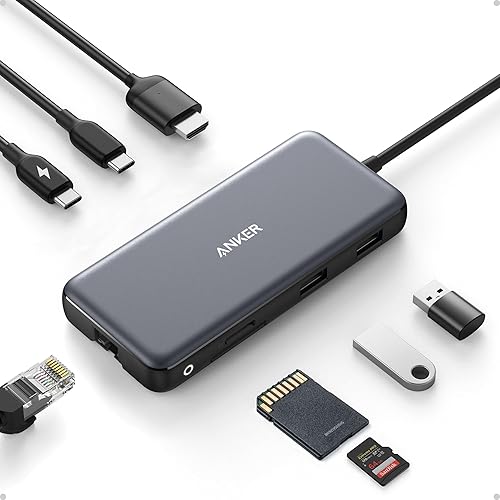 Click to zoom
The 555 is the hub we point most people toward because it doesn't force a compromise you'll regret. You get a genuine 4K@60Hz HDMI output (not the 30Hz that plagues cheaper hubs), a 10Gbps USB-C data port fast enough for an external SSD, two USB-A ports, Gigabit Ethernet, and full-size plus microSD card slots — all in an aluminum shell that doubles as a heatsink. It's the pick PCWorld and Engadget roundups have repeatedly landed on in this class.
- Display
- 4K@60Hz HDMI rated
- Power
- 85W PD passthrough rated — owner reports and independent reviews of hubs in this class put real delivered wattage below the rated ceiling due to hub overhead reported
- Data
- 1x USB-C 10Gbps + 2x USB-A rated
- Network
- Gigabit Ethernet
- Storage
- SD + microSD card readers
- Build / warranty
- Aluminum; Anker 18-month warranty
The one honest caveat: like nearly all single-cable hubs in this range, the HDMI tops out at a single 4K@60Hz display. If you need two external monitors, look at the UGREEN below. For a single-monitor desk or a laptop bag, this is the one to beat.
Check price on Amazon →UGREEN Revodok Pro 210 10-in-1
~$70 Click to zoom
If your problem is "I have two monitors and one laptop port," this is the affordable answer. The Revodok Pro 210 carries dual HDMI outputs, steps PD up to 100W, and packs a deeper port array than the Anker — two USB-C plus three USB-A at 5Gbps, Gigabit Ethernet, and SD/TF readers. XDA-Developers reviewed UGREEN's Revodok 10-in-1 favorably, calling it "one dongle to do it all."
- Display
- Dual HDMI — 4K@60Hz single output / up to 8K@30Hz single rated
- Power
- 100W PD passthrough rated
- Data
- 2x USB-C + 3x USB-A, 5Gbps rated
- Network
- Gigabit Ethernet
- Storage
- SD + TF (microSD) card readers
Read the dual-display fine print before you buy: how two monitors behave (mirrored vs. extended, and at what refresh rate) depends heavily on whether your laptop is a Mac or a Windows machine and whether it supports DisplayPort Alt Mode with dual streams. Many Apple Silicon MacBooks will mirror rather than extend across two displays from a hub like this. That's a laptop limitation, not a hub defect — but it catches people out, so confirm your machine's multi-monitor support first.
Check price on Amazon →Anker 7-in-1 USB-C Hub
~$20–26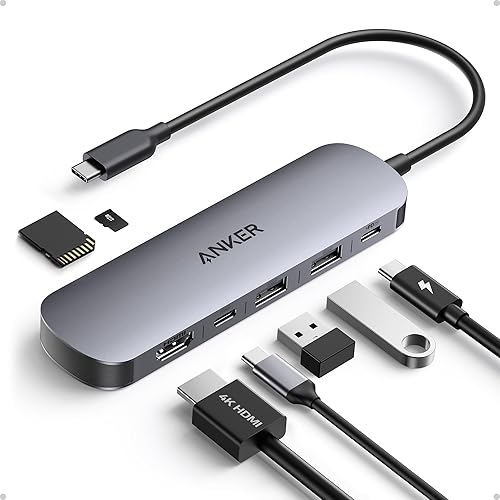 Click to zoom
For travel or a light setup, you don't need to spend $70. Anker's 7-in-1 covers the essentials — 4K@60Hz HDMI, 85W max PD passthrough, two 5Gbps USB-A ports, a USB-C data port, and SD/microSD slots — and frequently drops to around $26 or lower. It's small enough to forget in a bag, which is exactly what you want from a travel hub.
- Display
- 4K@60Hz HDMI rated
- Power
- 85W max PD passthrough rated
- Data
- 2x USB-A 5Gbps + 1x USB-C data rated
- Storage
- SD + microSD card readers
- Network
- None — no Ethernet
The trade-off is right there in the spec sheet: no wired Ethernet. If you work off Wi-Fi and just need a display and a couple of ports on the road, that omission won't matter. If a hardwired network jack is non-negotiable, spend up to the Anker 555. At this price, it's hard to argue with.
Check price on Amazon →CalDigit TS4 Thunderbolt 4 Dock
~$299–329 (MSRP $399) Click to zoom
This is a different category of device. The TS4 is not a bus-powered dongle — it's a powered Thunderbolt 4 dock that anchors a permanent desk, and it has one of the most complete port arrays on the market: 18 ports including three downstream Thunderbolt 4 (40Gbps), three USB-C and five USB-A at 10Gbps, 2.5 Gigabit Ethernet, an SD reader, and audio. It charges a laptop at up to 98W and drives a single 8K or dual 6K@60Hz display over Thunderbolt.
- Interface
- Thunderbolt 4, 40Gbps rated
- Display
- Single 8K or dual 6K@60Hz rated
- Power
- Up to 98W laptop charging rated
- Ports
- 18 total: 3x TB4, 3x USB-C + 5x USB-A (10Gbps), 2.5GbE, SD, audio
- Notes
- Externally powered; requires a Thunderbolt 4 (or compatible) host
Two honest caveats. First, the price: at $399 MSRP it costs more than some of the laptops people plug into it, though it regularly sells in the $299–329 range on Amazon. Second, you need a Thunderbolt 4 host to unlock the full 40Gbps and dual-6K capability — plug it into a plain USB-C laptop and you're paying for bandwidth you can't use. If you have a TB4 MacBook or Windows ultrabook and want a single cable to run your entire desk, nothing on this list touches it.
Check price on Amazon →Nerd Box: Alt Mode vs. DisplayLink vs. Thunderbolt — and where your charge goes
There are three fundamentally different ways a hub drives a display, and they aren't interchangeable. Native DisplayPort Alt Mode reroutes some of the USB-C port's own high-speed lanes to carry a real DisplayPort/HDMI signal — clean, low-latency, no drivers, but limited by how many lanes your laptop is willing to give up (which is why so many machines do one 4K@60Hz display and no more). DisplayLink instead compresses the video in software and pushes it over plain USB data, which lets a hub add extra monitors your laptop's lanes couldn't natively support — at the cost of some CPU overhead and a driver install. Thunderbolt (the TS4) carries DisplayPort natively inside its 40Gbps pipe, which is how it drives dual 6K where cheaper hubs stall.
The other number that surprises people is power. An "85W PD passthrough" hub does not deliver 85W to your laptop. The hub taps some of that budget to run its own controllers, Ethernet PHY, and display chip, and the DC conversion loses a bit more as heat. Independent reviews and owner reports across this class typically show real delivered wattage landing meaningfully below the rated figure — so a hub rated for 85–100W passthrough is the right target if you want a genuinely fast laptop charge while everything else is plugged in. Treat the rated number as a ceiling, not a promise.
Compare All Four
| Pick | Best for | Display (rated) | PD (rated) | Ethernet | Price |
|---|---|---|---|---|---|
| Anker 555 8-in-1 | Overall / single monitor | 4K@60Hz HDMI | 85W | Gigabit | ~$45–50 |
| UGREEN Revodok Pro 210 | Multi-monitor | Dual HDMI (8K@30 single) | 100W | Gigabit | ~$70 |
| Anker 7-in-1 | Budget / travel | 4K@60Hz HDMI | 85W max | None | ~$20–26 |
| CalDigit TS4 | Full desk dock (TB4) | Single 8K / dual 6K@60 | 98W | 2.5GbE | ~$299–329 |
Bottom Line
For most people, the Anker 555 is the right buy: it does the four things a hub needs to do — real 4K@60Hz, fast charging passthrough, wired networking, and 10Gbps data — without overpaying. Step up to the UGREEN Revodok Pro 210 only if you genuinely need two external displays and have confirmed your laptop can drive them. Travel light or on a tight budget? The Anker 7-in-1 covers the basics for around $26. And if you're building a permanent Thunderbolt 4 desk and want one cable to rule it, the CalDigit TS4 is the endgame — just make sure your laptop can actually use it.