Best Monitors for Home Office 2026
Ranked for the things a work-from-home desk needs: one-cable USB-C or Thunderbolt docking, crisp text all day, an ergonomic stand, and a webcam angle that makes you look human on calls.
TL;DR
- Best overall: the Dell UltraSharp U2725QE is the WFH monitor to beat — 27" 4K IPS Black, Thunderbolt 4 dock with up to 140W power, built-in KVM and ethernet. One cable runs your laptop, docks your peripherals, and charges the machine.
- Want sharp text without paying for 4K? The Dell UltraSharp U2724DE is a QHD IPS Black hub with 90W USB-C, KVM and ethernet — the productivity sweet spot.
- Multitasker: the LG 34WP85CN-B ultrawide replaces a dual-monitor setup and still charges your laptop at 90W over USB-C.
- On a budget? Get 4K and USB-C cheaply with the Dell S2722QC, or spend the least on the good BenQ GW2786TC (under ~$200) with a built-in noise-canceling mic.
A great home-office monitor is a different animal from a great gaming or creative display. You don't need 240Hz. You need a screen that docks your laptop with one cable, renders 10-point type without fuzzing the edges, tilts and rises so your neck survives an eight-hour day, and puts a webcam at a flattering height. This guide focuses squarely on that — it's distinct from our general best-monitors guide, which weighs gaming and color-grading needs too.
How We Evaluate Home Office Monitors
Loiter Point does not run a testing lab, and we have not put these monitors on a colorimeter ourselves. Instead we synthesize published independent testing — principally RTINGS, PCWorld, and Display Ninja — alongside a wide read of verified-owner reports, then weight what matters for work from home:
Single-cable docking (USB-C or Thunderbolt power delivery, plus downstream USB, ethernet and KVM) · text clarity (pixel density and contrast, since crisp black text on white is the whole job) · ergonomics (height, tilt, swivel) · and video-call comfort (webcam height, and mic or speaker extras). Where independent numbers exist we cite them as "est. real-world" or "reported." Where they don't, we say so. Spec-sheet claims are labeled "rated" — never "measured."
A note on prices: street prices on monitors move constantly with sales and stock. Every figure below is approximate as of July 2026 — check the live listing before you buy.
 Click to zoom
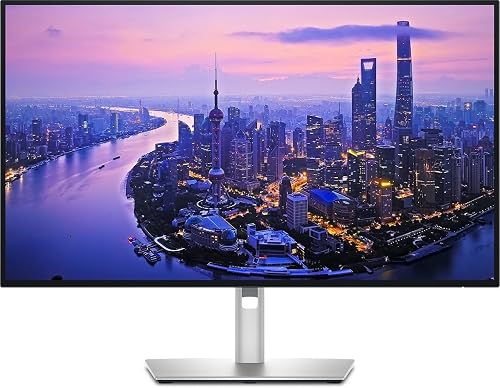
Dell UltraSharp U2725QE
Typically around $642–680 (MSRP $869.99)| Spec | Rated | Est. real-world / reported |
|---|---|---|
| Panel | 27" 4K IPS Black, 120Hz | Blacks that look black, not gray |
| Contrast | 3000:1 | IPS Black class — ~3× standard IPS |
| Brightness | 450 nits, DisplayHDR 600 | Comfortable for a bright home office |
| Color | 99% DCI-P3 | Wide-gamut, well-regarded by reviewers |
| Docking | Thunderbolt 4, up to 140W PD, KVM, ethernet | True single-cable dock for most laptops |
Verdict: This is the WFH monitor to beat. PCWorld names it their best work-from-home pick (around $680), praising IPS Black for delivering blacks that look black rather than washed-out gray — a real difference for dark-mode coding and long reading. The Thunderbolt 4 hub with up to 140W power delivery, built-in KVM and ethernet means one cable charges a beefy laptop and connects everything on your desk. RTINGS has reviewed it as well. If your budget stretches here, stop shopping.
Check price on Amazon → Click to zoom
Dell UltraSharp U2724DE
Typically around $490–600 (Dell lists $599.99)| Spec | Rated | Est. real-world / reported |
|---|---|---|
| Panel | 27" QHD 2560×1440 IPS Black, 120Hz | Sharp text without a 4K price |
| Contrast | IPS Black (~3000:1 class) | Deeper blacks than standard IPS |
| Docking | USB-C hub, 90W PD, ethernet, KVM | Charges most ultrabooks with headroom |
| Review | — | Display Ninja 2026 review: strong productivity hub |
Verdict: The sensible-money sweet spot. You give up 4K sharpness versus the U2725QE, but keep IPS Black contrast, a 90W USB-C dock, ethernet and KVM — the full productivity feature set. Display Ninja's 2026 review rates it a strong all-around office display. QHD at 27" still renders crisp text, and 90W comfortably tops up most 13–14" ultrabooks. If 4K isn't essential, this saves you real money without cutting the features that matter for docking.
Check price on Amazon →Why "IPS Black" matters for a working display
Standard IPS panels are rated roughly 1000–1300:1 contrast. That's fine, but in a dim room the "black" of the screen is really a dark gray, and it saturates the white text sitting on it. Dell's IPS Black panels (used in both UltraSharp picks above) are rated around 3000:1 — roughly triple the contrast.
For home-office work that translates directly: crisper black-on-white body text, and dark-mode IDEs and documents that read as dark instead of murky gray. You won't get OLED-level infinite contrast, but for hours of reading and coding it's the single most noticeable panel upgrade in this class — and it's why our two top picks both use it.
 Click to zoom
LG 34WP85CN-B
Typically around $500–700 (listed ~$699.99, often discounted)| Spec | Rated | Est. real-world / reported |
|---|---|---|
| Panel | 34" curved 21:9 UltraWide QHD 3440×1440 IPS | Replaces a two-monitor layout |
| Color | 95% DCI-P3, HDR10 | Wide gamut; HDR is entry-level |
| Docking | USB-C, 90W PD | One cable for video + 90W charging |
| Ergonomics | Height + tilt stand | Adjustable for a long workday |
Verdict: If your workflow means three windows side by side — docs, chat, and a spreadsheet — a 34" ultrawide beats a single 27". This LG gives you 3440×1440 across a gentle curve, a 95% DCI-P3 rating, and 90W USB-C so the same cable that carries the picture also charges your laptop. The height-and-tilt stand keeps it ergonomic. HDR10 is present but modest; buy this for the desktop real estate, not for HDR movies.
Check price on Amazon → Click to zoom
Dell S2722QC
Typically around $330–400| Spec | Rated | Est. real-world / reported |
|---|---|---|
| Panel | 27" 4K IPS, 60Hz | Sharp text; standard-IPS blacks |
| Contrast | 1300:1 | Low contrast; mediocre HDR reported |
| Brightness | 350 nits | Fine indoors, not for bright rooms |
| Color | 99% sRGB | Good for office, not wide-gamut work |
| Docking / audio | USB-C 65W PD, dual 3W speakers | 65W suits thin ultrabooks, not big laptops |
Verdict: The cheapest way onto a 4K USB-C desk — with sacrifices, as PCWorld's review ("Affordable 4K and USB-C, with sacrifices") spells out: low contrast and mediocre HDR. RTINGS has also reviewed it. But for a home office the 4K sharpness for text is the headline, and built-in speakers plus one-cable 65W charging make it a tidy setup for a 13" ultrabook. Know that 65W won't fully sustain a power-hungry gaming or workstation laptop under load.
Check price on Amazon → Click to zoom
BenQ GW2786TC
Typically around $200| Spec | Rated | Est. real-world / reported |
|---|---|---|
| Panel | 27" 1080p IPS, 100Hz | Lower density; fine at normal viewing distance |
| Docking | USB-C 65W PD, daisy chain | One-cable charging for ultrabooks |
| Ergonomics | Height-adjustable stand | Rare at this price |
| Call comfort | Noise-canceling mic, eye-care modes | Built-in mic handy for meetings |
Verdict: PCWorld calls it "a great budget USB-C monitor for your home office," and for under ~$200 it packs features that usually cost more: a height-adjustable stand, 65W USB-C charging, daisy-chaining, a built-in noise-canceling mic, and coding/ePaper eye-care modes. The trade-off is 1080p on a 27" panel — text isn't as crisp as the 4K and QHD picks — but at normal desk distance it's perfectly usable. The best pick when price is the priority.
Check price on Amazon →65W vs 90W vs 140W: which laptop does each sustain?
The wattage on a monitor's USB-C or Thunderbolt port decides whether it can keep your laptop charged while you work, or just slow the battery drain.
65W (Dell S2722QC, BenQ GW2786TC) comfortably powers thin 13–14" ultrabooks, but a heavy laptop under load can still lose charge. 90W (Dell U2724DE, LG 34WP85CN-B) handles the vast majority of 14–16" laptops with headroom. 140W (Dell U2725QE, over Thunderbolt 4) is aimed at power-hungry 16" and workstation-class machines — the ones that shipped with a big brick. Match the wattage to your laptop's own charger, and one cable does everything.
Compare All Five Picks
| Monitor | Best for | Size / Res | Panel | USB-C / TB PD | Approx price |
|---|---|---|---|---|---|
| Dell U2725QE | Best overall | 27" 4K, 120Hz | IPS Black (3000:1 rated) | Thunderbolt 4, 140W | ~$642–680 |
| Dell U2724DE | QHD productivity hub | 27" QHD, 120Hz | IPS Black | USB-C, 90W | ~$490–600 |
| LG 34WP85CN-B | Ultrawide multitasking | 34" UWQHD, curved | IPS | USB-C, 90W | ~$500–700 |
| Dell S2722QC | Budget 4K | 27" 4K, 60Hz | IPS (1300:1 rated) | USB-C, 65W | ~$330–400 |
| BenQ GW2786TC | Cheapest good pick | 27" 1080p, 100Hz | IPS | USB-C, 65W | ~$200 |
Bottom Line
For most people building a work-from-home desk, the Dell UltraSharp U2725QE is the clearest buy: 4K sharpness, IPS Black contrast, and a 140W Thunderbolt 4 dock that turns a laptop into a full workstation over a single cable. If you'd rather not pay for 4K, the U2724DE keeps every docking feature at QHD for less. Heavy multitaskers should look at the LG 34WP85CN-B ultrawide. And if you're watching the budget, the Dell S2722QC gets you 4K and USB-C cheaply (with contrast and HDR caveats), while the BenQ GW2786TC is a good sub-$200 pick with a built-in mic for calls. Street prices move — check the live listing before you buy.